> ## Documentation Index
> Fetch the complete documentation index at: https://docs.zappl.co/llms.txt
> Use this file to discover all available pages before exploring further.
# Command Line
> The Zappl agent is essentially a macOS command line tool consisting of the following flags.
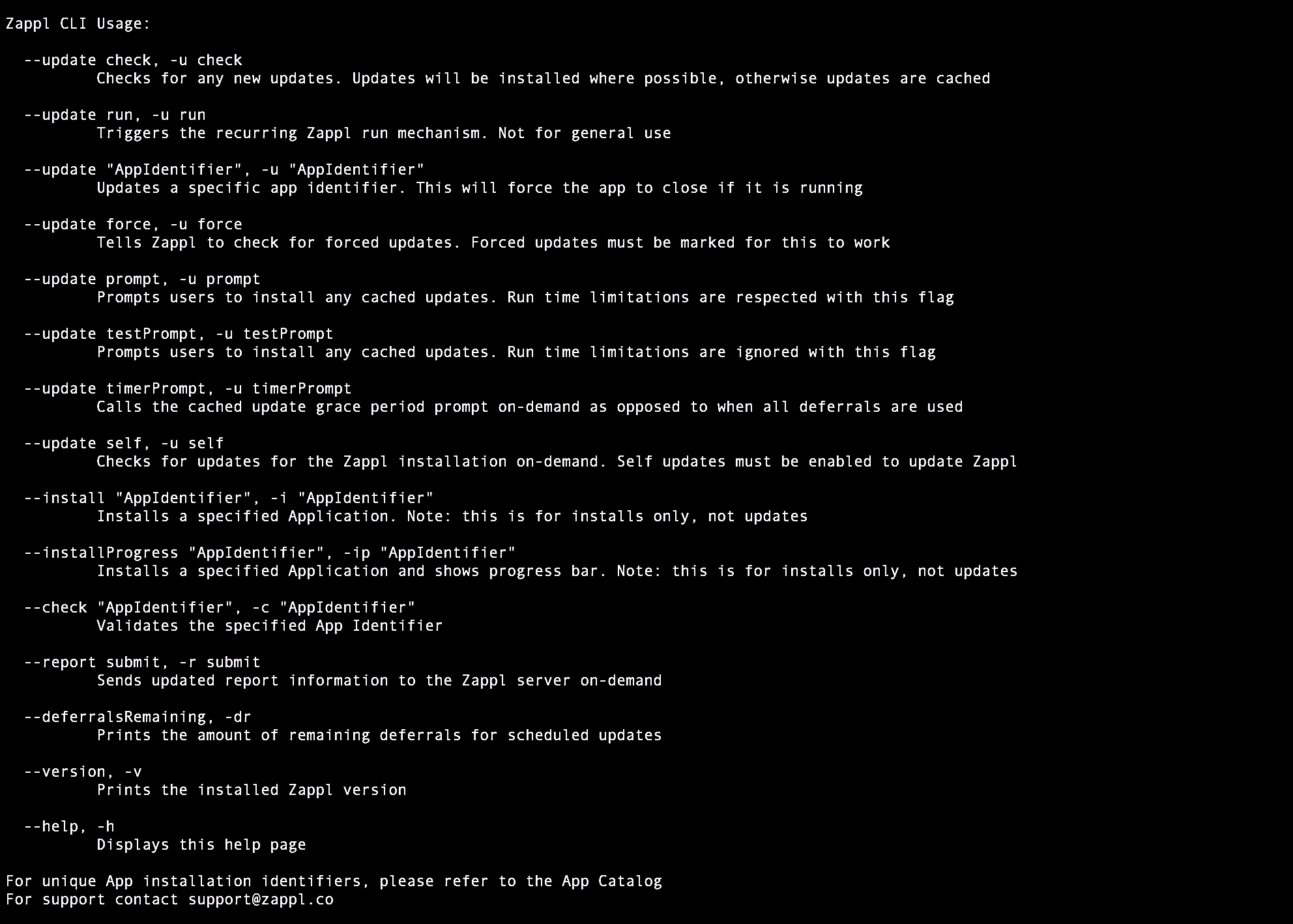 For the day to day running of Zappl, the recurring run launch daemon initiates background, scheduled and forced updates by utilising the command line options. Likewise, the **Zappl Software Deployment Script** which integrates with MDMs such as Jamf Pro utilises the command line options for features such as Application installs and marking Apps for forced updates.
The Zappl agent is located in the `/Library/Application Support/DARE/Zappl/Bin/` directory, and is symlinked at `/usr/local/bin/zappl`.
The command line options available are useful in scenarios such as when testing or troubleshooting Zappl workflows.
## Command Line Options
All options must be prefixed with `sudo zappl` (unless you push any of these options through an MDM which executes them as *root* - in that case `sudo` is not required).
#### Show Help
```bash theme={null}
--help
```
Displays a Zappl help page. *This does not require elevated privileges.*
#### Check for Application Updates
```bash theme={null}
--update check
```
This option is useful when testing update workflows as it tells Zappl to check for and download any available App updates. This option is automatically run in the background once every hour, and is responsible for silently installing updates for Apps that are not running and caching updates for Apps that are running. If you are testing scheduled or forced update workflows, ensure that the App you want to be prompted to update is open when you run this, otherwise the App will be silently updated immediately after the update has downloaded and no prompts will be displayed.
#### Begin Recurring Run Mechanism
```bash theme={null}
--update run
```
**Not for general use.**
This option is called upon once every **15 minutes** by the recurring run daemon located at `/Library/LaunchDaemons/com.dare.zappl.run.plist` and is responsible for checking for forced update receipts, checking for new updates on an hourly basis and running the scheduled update mechanism in line with any configured custom preferences.
#### Update a Specific App
```bash theme={null}
--update "AppIdentifier"
```
Updates a specific app identifier (if applicable). This will force the app to close if it is running before proceeding with the update. This option is silent - no progress bar is shown during the update.
#### Force Application Updates
```bash theme={null}
--update force
```
This option can be called manually to tell the agent to check for any Apps that have been marked for forced updates. If a forced update receipt is found, the agent will attempt the update. If no receipt is found, the agent will exit and take no further action.
For the day to day running of Zappl, the recurring run launch daemon initiates background, scheduled and forced updates by utilising the command line options. Likewise, the **Zappl Software Deployment Script** which integrates with MDMs such as Jamf Pro utilises the command line options for features such as Application installs and marking Apps for forced updates.
The Zappl agent is located in the `/Library/Application Support/DARE/Zappl/Bin/` directory, and is symlinked at `/usr/local/bin/zappl`.
The command line options available are useful in scenarios such as when testing or troubleshooting Zappl workflows.
## Command Line Options
All options must be prefixed with `sudo zappl` (unless you push any of these options through an MDM which executes them as *root* - in that case `sudo` is not required).
#### Show Help
```bash theme={null}
--help
```
Displays a Zappl help page. *This does not require elevated privileges.*
#### Check for Application Updates
```bash theme={null}
--update check
```
This option is useful when testing update workflows as it tells Zappl to check for and download any available App updates. This option is automatically run in the background once every hour, and is responsible for silently installing updates for Apps that are not running and caching updates for Apps that are running. If you are testing scheduled or forced update workflows, ensure that the App you want to be prompted to update is open when you run this, otherwise the App will be silently updated immediately after the update has downloaded and no prompts will be displayed.
#### Begin Recurring Run Mechanism
```bash theme={null}
--update run
```
**Not for general use.**
This option is called upon once every **15 minutes** by the recurring run daemon located at `/Library/LaunchDaemons/com.dare.zappl.run.plist` and is responsible for checking for forced update receipts, checking for new updates on an hourly basis and running the scheduled update mechanism in line with any configured custom preferences.
#### Update a Specific App
```bash theme={null}
--update "AppIdentifier"
```
Updates a specific app identifier (if applicable). This will force the app to close if it is running before proceeding with the update. This option is silent - no progress bar is shown during the update.
#### Force Application Updates
```bash theme={null}
--update force
```
This option can be called manually to tell the agent to check for any Apps that have been marked for forced updates. If a forced update receipt is found, the agent will attempt the update. If no receipt is found, the agent will exit and take no further action.
To mark an App for a forced update, see [Forced Updates](/apps/updates#forced-updates). This option is also called automatically every **15 minutes** as part of the run flag by the main recurring run daemon located at `/Library/LaunchDaemons/com.dare.zappl.run.plist`.
#### Prompt to Install Cached Updates
```bash theme={null}
--update prompt
```
This option can be called manually to tell the agent to check for any pending cached updates. If the agent finds cached updates, it then checks [Run Limitation Options](/customise/preferences#run-limitation-options) and if necessary prompts the user to install the pending cached updates.
Using this option at the command line will simulate what happens when the daemon calls the option. This is a good way to test the scheduled updates workflow on-demand after [Configuring Custom Preferences](/customise/preferences).
This option is also called automatically every **15 minutes** as part of the run flag by the main recurring run daemon located at `/Library/LaunchDaemons/com.dare.zappl.run.plist`.
#### Prompt to Install Cached Updates and Override Limitations
```bash theme={null}
--update testPrompt
```
This is identical to the `sudo zappl --update prompt` flag, with the exception that all run and elapsed time limitations will be **ignored**. If you are using the command line options to test Zappl prompts, this flag is ideal as it can be used to repeatedly display the scheduled update prompts on-demand.
#### On-Demand Cached Update Grace Period Prompt
```bash theme={null}
--update timerPrompt
```
When this option is called, the grace period prompt normally shown when all deferrals have been used is displayed. This option is mainly used during testing, or when creating custom bespoke workflows for forcing updates on set deadlines as opposed to the recurring automation that Zappl natively offers.
#### Check for Zappl Component Updates
```bash theme={null}
--update self
```
This option checks for any available updates for Zappl and it’s components. In order to utilise this option, @Automatic Self Updates must be enabled.
#### Silent Application Installs
```bash theme={null}
--install "AppIdentifier"
```
This is the option utilised by the @Deploy Software Script when performing a silent Application install. When calling this option via command line, replace *"AppIdentifier"* with the App's Unique Identifier which can be found in our [App catalog](https://zappl.co/app-catalog).
#### Application Installs with Installation Progress
```bash theme={null}
--installProgress "AppIdentifier"
```
This is the option utilised by the @Deploy Software Script when using the `install-showProgress` action to perform an Application install which displays installation progress. When calling this option via command line, replace `"AppIdentifier"` with the App's Unique Identifier which can be found in our [App catalog](https://zappl.co/app-catalog).
#### Validate an Application Installation Format
```bash theme={null}
--check “AppIdentifier”
```
**Not for general use.**
Outputs whether the defined App installation format is valid. This is utilised by the @Deploy Software Script when validating if the defined App is valid before proceeding and marking the App for a forced update. For App installation formats, see the online [App Catalog](https://zappl.co/app-catalog).
#### Send Report Information to Zappl
```bash theme={null}
--report submit
```
This will send updated report information to the Zappl server, on-demand, which allows up-to-date information on application versions and more to be viewed in the online [Zappl Portal](/portal/general).
#### Output Deferral Count
```bash theme={null}
--deferralsRemaining
```
Displays the amount of remaining deferrals for scheduled updates
#### Output Current Zappl Version
```bash theme={null}
--version
```
Displays the version of Zappl running on the computer. *This does not require elevated privileges.*